A minimal shell prompt
Powerline was cool for my Zsh, but too resource intensive and all these fancy graphics don’t help to focus more on my current task.
Now I use a much simpler prompt explained below.
Note that I don’t even bother to use a particular symbol after the prompt (like the classic $). I only add a space character.
The setup is visible here, ready to be copied to your .zshrc if you also enjoy minimalism.
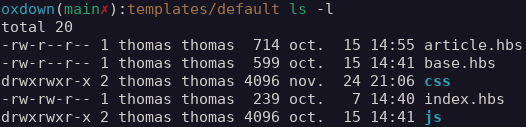
Variant 1: In a Git repository
I spend most of my shell time there. In this case I focus on the most important information I need:
- Name of the root directory of the repository
- Current branch name
- Is the working copy dirty or not; I make efforts to have my working copies as clean as possible, by committing often and avoiding junk files
- Relative path from the root of the repository
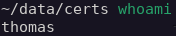
Variant 2: Not in a git repository
Then I only display the current directory, without any colors.
It cannot be simpler.
By Thomas Martin
Follow me or comment